The Problem with Invoice Tools
Most invoicing tools want you to create an account, connect your bank, and commit to a monthly plan before you can generate a single invoice. If you're a freelancer who sends 2-3 invoices a month, that's overkill.
The Quick Solution
EaziApps Invoice Generator is a browser-based form that creates a clean PDF invoice in about 2 minutes. No signup, no cloud storage, no subscription.
Step-by-Step Guide
Step 1: Open the Tool
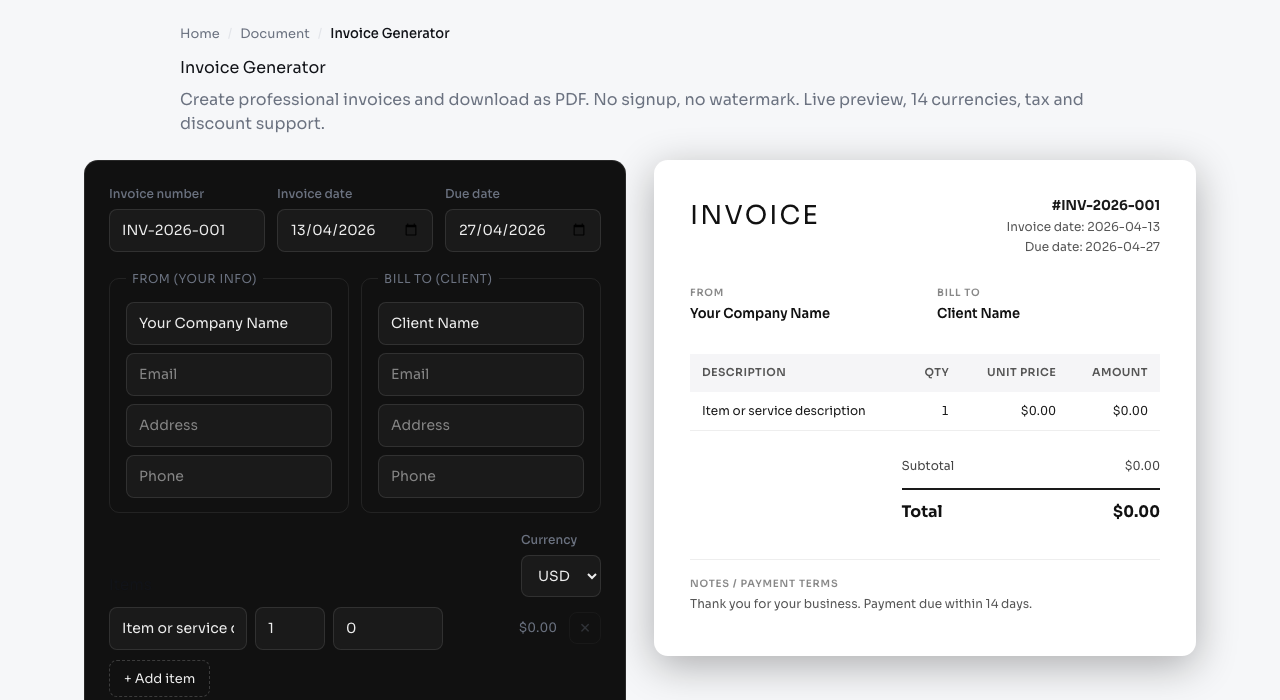
Go to Invoice Generator. You'll see a form on the left and a live PDF preview on the right.
Step 2: Fill In Your Details
Invoice header:
- Invoice number (auto-generated, editable)
- Invoice date and due date
- Currency (14 options: USD, EUR, GBP, AUD, KRW, JPY, and more)
From (your company):
- Company name
- Address
- Email / phone
Bill To (your client):
- Client name
- Client address
- Client email
Step 3: Add Line Items
Click "Add item" to create rows. Each row has:
- Description
- Quantity
- Unit price
The total is calculated automatically. You can add as many rows as needed.
Step 4: Tax and Discount
- Tax rate: Enter a percentage (e.g., 10% GST). Applied to the subtotal. If you bill across US states and need the right rate, work it out first with the Sales Tax Calculator.
- Discount: Enter a flat amount or percentage to subtract. The Percentage Calculator is handy when you agreed on a dollar figure and need the matching percentage.
Both are optional. The preview updates in real-time as you change values.
Step 5: Add Notes
The "Notes" field at the bottom appears on the PDF. Use it for payment terms, bank details, or thank-you messages.
Step 6: Download
Click the download button. A clean PDF is generated locally using jsPDF and downloaded to your device. Your data never touches a server.
What the Invoice Looks Like
The generated PDF has a clean, professional layout:
- Your company info and logo area at the top
- Client details on the right
- Line items table with quantities and prices
- Subtotal, tax, discount, and total at the bottom
- Notes section
Currency Formatting
The tool uses Intl.NumberFormat to properly format amounts for each currency:
| Currency | Format |
|---|---|
| USD | $1,234.56 |
| EUR | 1.234,56 |
| KRW | 1,234 |
| JPY | 1,234 |
No more manually adding currency symbols or decimal formatting.
Privacy
Your invoice data (company name, client info, amounts) is never sent anywhere. The PDF is generated entirely in your browser using client-side JavaScript. When you close the tab, the data is gone.
This matters if you're invoicing for consulting, legal, or medical work where client confidentiality is important.
What a Professional Invoice Should Include
A quick invoice still needs the right details to look credible and to actually get paid. Make sure every invoice has these elements.
- A clear label and unique number so both sides can reference it later.
- Your business name and contact details, plus a tax or business number if your region requires one.
- The client's name and address, matching how they file their records.
- Issue date and due date, since a due date sets a clear expectation.
- An itemized list with a description, quantity, and unit price for each line.
- Subtotal, any tax, any discount, and a bold total so the amount owed is unambiguous.
- Payment instructions in the notes, such as bank details or accepted methods.
Leaving out the due date or payment instructions is the most common reason an otherwise fine invoice sits unpaid.
Getting Paid Faster
The format of an invoice quietly affects how quickly it is paid. Send it promptly, because an invoice that arrives the day work finishes is paid sooner than one sent weeks later. State clear terms such as payment due within fourteen days rather than a vague on receipt. Make the total easy to find and the payment method easy to act on. For larger projects, consider invoicing a deposit up front and the balance on completion. A polite thank-you line in the notes costs nothing and keeps the relationship warm for repeat work.
Common Invoicing Mistakes
- Reusing the same invoice number, which confuses your records and your client's.
- Forgetting the due date, leaving payment timing open-ended.
- Vague line items like services rendered instead of a specific description.
- Wrong tax handling, either charging tax you should not or omitting tax you must.
- No copy for yourself, so download and file every invoice you send.
Frequently Asked Questions
Is this invoice legally valid? A PDF invoice with your details, the client's details, itemized charges, and a total is a standard business document. Requirements vary by country, so confirm local tax and registration rules if you are unsure.
Can I add my logo? The layout includes space for your company information at the top. For a full logo, some users add it after export in a PDF editor.
Do you store my invoice data? No. The PDF is generated in your browser with jsPDF, and nothing is sent to a server. Closing the tab clears the data, so keep the downloaded file.
Which currencies are supported? Fourteen, including USD, EUR, GBP, AUD, KRW, and JPY, each formatted correctly with the right symbol and decimal style.
When to Use Something Else
This tool is great for quick, one-off invoices. If you need:
- Recurring invoices - use Wave (free) or Xero
- Payment tracking - use FreshBooks or QuickBooks
- Automatic reminders - use any full invoicing platform
But if you just need to send a professional invoice right now without creating yet another account, this is the fastest way.